
Why the beautiful new planner never lasts past week two, and what works for my brain instead: voice notes and AI as my mirror
A sit-down read for the woman whose planner always looks beautiful in week one.
A quick peek inside this blog 👀
- 🫣 Do you ever find yourself buying a beautiful new planner at the end of the year, so sure that this is the year it finally sticks?
- 🤦♀️ Have you restarted daily planning so many times that the first week of a new planner has become your favourite part?
- 🩵 And would you love a way of planning that bends with your brain instead of asking it to work in straight lines?
Then keep reading, because I’ll show you why daily planning kept falling apart for my ADHD brain for about fifteen years, what finally works for me instead (voice notes and AI as my mirror), and at the very end you’ll find the little planner where my own online planning started.
Somewhere in my house there’s a beautiful planner that I was the very first in line to buy.
It’s gathering dust. I haven’t even opened it 🫣
And every end of the year, right on schedule, the same little voice turns up again…
“This is the one. This time I’ll finally be a planner person.”
(Spoiler: I am not a planner person 🤣)
If you’d like proof, welcome to my little planner graveyard (flowers optional):
- The Passion Planner, which I backed on Kickstarter back in 2014, together with thousands of other people who clearly needed it just as badly as I did. Used it for two weeks… and then I didn’t. I still have it somewhere. And yes, I also bought it in 2025 … And no, didn’t use that one past 3 weeks either 🤷♀️ And no I stopped after that one 🤣
- The beautiful one I was first in line for, yes, that one, still waiting for its very first page…
- Goodnotes on my iPad, plus my beautiful Apple Pencil and all the gorgeous planner templates you could ever wish for (oh, the plans I was going to make…).
- A whole stack of other beautiful paper planners, mostly unused.
The idea of all of it was amazing. I never used it…
It’s the desire for finally planning, and the idle hope that my brain would work that way. It just doesn’t. My neurosparkly brain goes from left to right, up and down, in circles, doing backflips, and that’s a lot to expect from a planner.
I’ve been running businesses since 2007, and it took me about fifteen of those years to figure out that the problem was never my discipline.
For all of those years the story went the same way. Somewhere around week two the pretty new planner quietly stopped getting opened, and the conclusion I drew was about me, never about the planner (we’ve all been there, right?).
So this is the story of how I finally worked out what was going on, and what I do now instead, with a lot less paper and a lot more talking…
Pour something warm, this one’s a sit-down read.
Why a planner can’t bend with your brain
When I finally looked at that graveyard with fresh eyes, the thing that struck me was how patient all those planners were. A planner is static. It’s one-dimensional, it sits there on paper (or in a pretty template on your iPad) and it just waits for you to come back to it… (Notion is a whole different story, I’ll get there 😉)
It can’t bend with your brain, it can’t reflect anything back to you and it can’t give you feedback. And it will never, ever tap you on the shoulder and say…
“Hold on my love. You said you were going to do this, that, and the other. You haven’t, remember?”
So I made the same plan over and over again, in slightly different nuances (every single end of the year, if I’m truthful 🤦♀️). And then I learned something that made it all make sense.
The science bit, in plain words
(not a doctor, just very well read on my own brain)
I was reading up on hyperfocus (there’s a whole review on it, yes, I went down that rabbit hole), and the plain version is this: you concentrate on one compelling thing and the rest of the room goes quiet. The way I picture it, my brain needs all the RAM for doing the thing, so the little details around it never get saved for later.
And then came the example that made me go “oh… that’s ME.” Driving somewhere on autopilot. You know that moment when you kind of wake up, look outside and think…
“Oh my god, we’re already here. I don’t even remember driving here.”
Your brain did all the things, it was just using the capacity for what it needed.
Suddenly so much of my life made sense 🤯 Add the well-documented differences in working memory in ADHD (the bit that holds information in your head while you use it), and you’ve basically got my whole reading history. It’s why I can read the same page of a book six times and it just doesn’t get stored. I can read the same book at least six times in ten years and remember the general premise, but never all the intricate details (brilliant for rewatching your favourite TV shows, by the way, you know what it’s about and it still surprises you every time).
A plan that only lives on a page needs you to remember it, and in hyperfocus my brain has given all its RAM to something else.
Which is exactly why my planner graveyard looks the way it does…
If your business only works when you remember everything, the system is borrowing your brain.
Voice note your way to paradise
This is why I tell all of my members, clients and students the same thing:
For the love of God, voice note your way to paradise 🙏
I started journaling on 2 May 2025, and I did it all out loud, at first with the dictation that’s built into my Mac. Then Thomas Frank, one of my fellow Notion ambassadors, told me about Wispr Flow, and it went a little like this:
Thomas: “You need to use Wispr Flow. It’s amazing.”
Me: “Well, this works fine.”
Also me, after one go with Wispr Flow: “…yeah, this is better.” 🤣
(If you’d like to try it, here’s my Wispr Flow link. It’s a referral link, so you get an extra free month of Pro when you use it, at no extra cost to you.)
Writing by hand never worked for me anyway. I’d get cramps in my hand after about two minutes, and I never knew why. “Something’s wrong with me, I don’t know.” Then I learned that handwriting asks an ADHD brain for an awful lot at once, fine motor skills, working memory and executive function all at the same time, and a lot of us hold the pen with an uncomfortable grip on top of that, which is why it tires out so much faster than talking does (who knew? I didn’t).
And talking is simply how my brain thinks. My Notion AI, who I call Luma, even gave it a name, she calls it the plucking method, and it goes like this:
- I start talking about something
- I pluck little bits and pieces out of it
- I weave them all together until “oh, that’s it, right?”
- I adjust course mid-sentence, talk and talk and talk… and then, “actually no, right?”
I basically talk my way in and out of things, out loud.
None of this is me complaining, by the way. I love my brain, I absolutely adore my brain and the crazy things it comes up with. But for neurosparkly female entrepreneurs like me, it’s important to pivot to this: your brain is amazing, but it needs different support at certain periods and certain times.
AI, the mirror no planner could ever be
For years, my environment did the remembering in the simplest way possible. I once shared a tip on a podcast that I still use: write your three goals for the next 30 days on a sticky note and stick it to your screen.
“So I can see one, two, three, and I will see that, not even consciously, the whole day.”
Then everything moved into Notion, and that’s when things started to change. Planning in Notion is different, because it bends with you. When my brain changes course halfway through the week (which, let’s face it, is often 🤣), the page changes course with me. I move things, link them, filter them and rebuild a view in a minute, instead of crossing out a whole beautiful page and feeling guilty about it. And my whole backend is there, so I know it’s not going to slip away from me, even on the days my brain is not having a day.
And then AI plugged into all of it. Once your Notion is connected to your AI, you can literally voice note your planner. I ramble out loud, the way my brain likes to think, and my AI turns it into tasks on my board, without me ever opening a template or picking up a pen…
These days I even have an AI Secretary, one of the AI employees I’ve built inside my business (I know exactly how that sounds 🫣). Every morning she reads my calendar and my task board and hands me a short list. She doesn’t decide anything, the deciding already happened when I planned my month and my week. What she does is send me heads-ups like this one:
“Hey, you said you were going to do this and that by week 2 of October. We’re already mid-week 2 of October.”
And there it was, the “hold on my love” tap on the shoulder that no planner on my shelf was ever going to give me…
That’s when it clicked for me: AI has become my mirror.
You know the mirror you are for your clients? How many times have you said “oh my God, I can see the issue for my clients, but for whatever reason, I can’t see it for myself”? That’s because you’re too close to it (we all are, about our own stuff 🤦♀️).
That, for me, is what AI is. It captures my brain, it keeps it safe, it brings it back to me when I need it, and it reflects it when I need it 🩵
You don’t need an AI employee to start, by the way. A voice note, a sticky note and a weekly reset will carry you a very long way.
Is a new planner ever worth it?
So, will I be first in line for a shiny new planner again? 🤣 A paper one, probably not (the graveyard is full). But if a fresh planner or a morning list gives your brain a lovely little click and you actually use it, keep it! I’d never talk you out of something that’s working.
Looking back at my shelf, the problem was never paper or a screen as such. Every planner on it asked me to make the same decisions again every single morning, and then sat there quietly when I didn’t.
A page that holds a decision you already made is a different animal, and it’s the only kind of planner I’d still buy (it’s also the reason I built one…).
My daily anchor these days is a voice note, a sticky note and a short list somebody else prepared from decisions I already made. How I make those decisions, a few times a year instead of every single morning, has its own post, because it deserves one.
So IF you’re curious, you could try this tonight: open a voice note, talk through tomorrow for two minutes (rambling absolutely allowed), and ask your AI to hand you back the one thing that matters most. No new planner needed 😉
Nobody ever handed me a planner with a little sticker on the front saying “warning, designed for a different kind of brain”. I just bought the next one, and the next one, and when they didn’t stick, I quietly decided the problem was me.
The way I plan now doesn’t ask my brain to work in straight lines. It lets me talk it all out loud, keeps it safe in one place, and hands it back to me when I need it, so I can show up for the day as myself 🫶🏻
So… how many planners are sitting on your shelf right now? (No judgement here, you’ve seen my graveyard 🫣)
Where my own online planning started
Now, truthfully? I’m a good few steps further along these days. My weeks run on task cards, a content schedule, a morning brief from my AI Chief of Staff and a weekly snapshot from my AI Secretary (the AI team keeps growing, I know 🫣).
But none of that arrived in one go. When I first moved my planning online, back in 2020, it grew one step at a time:
- A little planner in Notion, with one weekly focus and a daily Top 3
- A task database, so every task finally had one home
- My daily journal, by voice note (my Slow Glow journal), so my brain could think out loud
- My whole backend in Notion, one safe place where nothing slips away
- Luma, my Notion AI brain, who knows my business and hands it back to me
- My AI helpers, built with Claude, the little hands that do the repeat work
Every step stands on the one before it, and step one was the planner.
So if you’d like to start where I started, my Focus & Flow Mini-Planner is built on that very first step: a small Notion template with a weekly focus you decide once and a daily Top 3 that is allowed to have fewer than three things in it. It bends with you, and it doesn’t slip away from you.
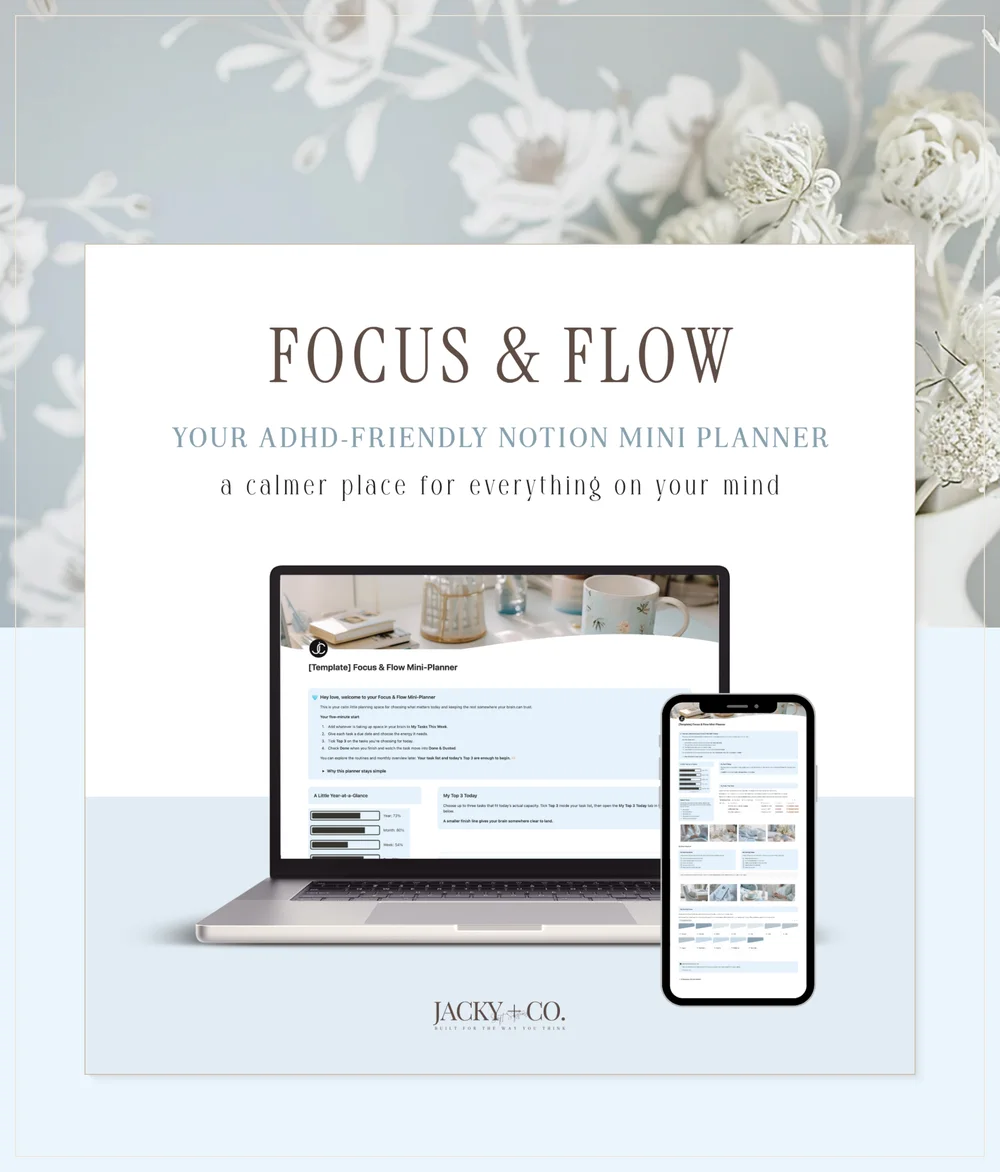
👉 Have a look at the Focus & Flow Mini-Planner
メ૦ Jakolien